前言
警告
本教程需要将脚本写入路由器的
/jffs分区。根据梅林固件的原作者,这样做会缩短路由器的寿命,因为其闪存芯片的写入次数很少(大概10万次左右),一旦写入次数太多,路由器将损坏!!!家里光猫改桥接,用K2P路由器拨号,我K2P刷的梅林固件,没有开机自启脚本功能,在网上搜索了一番,找到了这个有点危险的方法。
1. 路由器开启SSH登陆
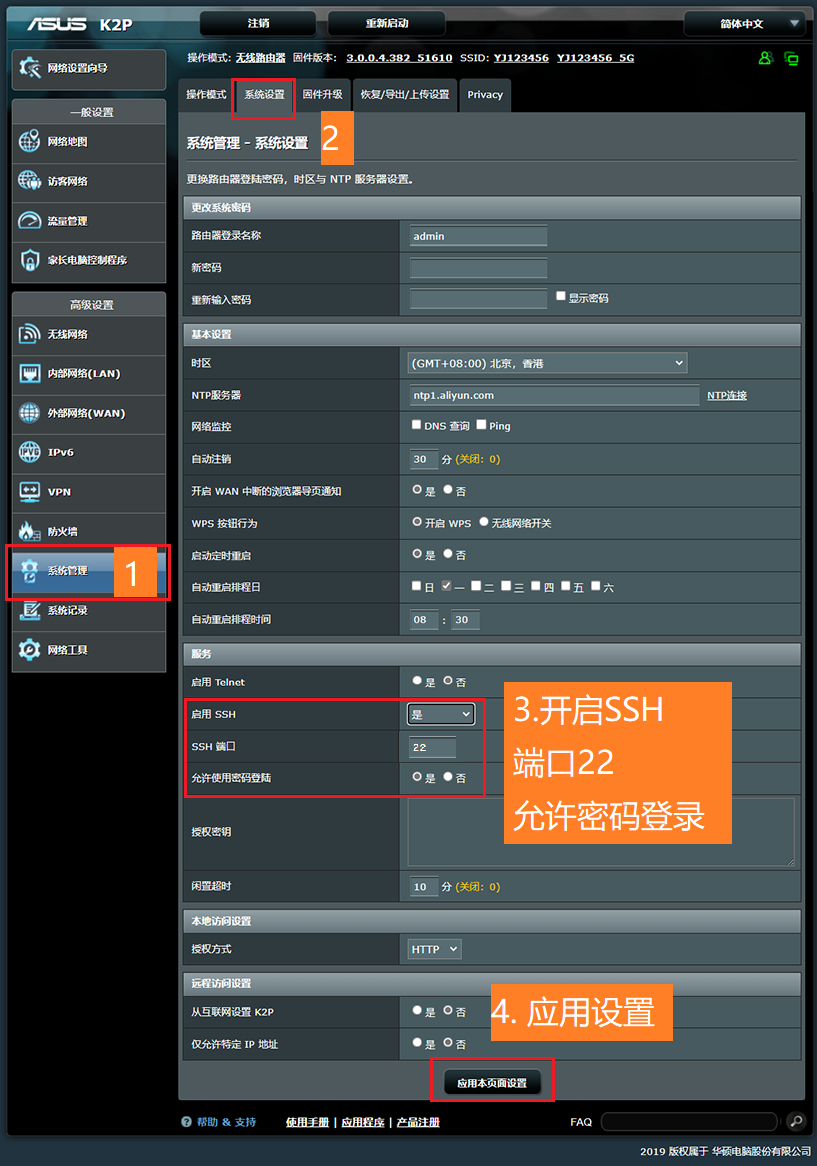
2. 开启jffs
使用ssh命令连接路由器
# admin是路由器的登录名
ssh admin@192.168.1.1
# 然后输入路由器的登陆密码
输入以下命令开启jffs
nvram set jffs2_enable=1
nvram set jffs2_exec="sh /jffs/netstart.sh"
nvram set jffs2_format=0
nvram set jffs2_on=1
nvram commit
3. 创建脚本
需要在/jffs文件夹内创建2个脚本,在别的文件夹创建都会被删除。
- 获取ip地址脚本
getip.sh - 定时运行脚本
netstart.sh
1. IP脚本 getip.sh
开机启动时运行该脚本,获取当前ip地址,与ip.txt保存的ip地址对比,如果不同,将当前ip地址保存到ip.txt,并且通过微信机器人发送到微信
#!/bin/sh
# getip.sh
ip=`ifconfig ppp0|grep inet|grep -v 127.0.0.1|grep -v inet6|awk '{print $2}'|tr -d "addr:"`
robot_body='{"msgtype":"text","text":{"content":"Home new ip is: '$ip'"}}'
webhock="https://qyapi.weixin.qq.com/cgi-bin/webhook/send?key=e4exj234-91da-123d-abf2-101b59c55e32"

towx() {
	wget -O /dev/null --no-check-certificate --header="Content-Type: application/json" --post-file=body.json $webhock
}

if [ -f "ip.txt" ]; then
	saved_ip=$(cat ip.txt)
	if [ "$ip" != "$saved_ip" ]; then
	echo "$robot_body" > body.json
	echo "$ip" > ip.txt
	towx
	fi
else
	echo "$ip" > ip.txt
	towx
fi
2. 运行脚本 netstart.sh
#!/bin/sh
# netstart.sh
nohup sh /jffs/getip > /dev/null 2>&1 &